Videos
Stained Glass OS on YouTube, newest first. Each video's narration is below it as a transcript. New videos come out on the project's YouTube channel.
Is Stained Glass OS just reskinned Linux?
15 November 2026. The answers to the first video's questions: multi-monitor support (a taskbar on every display), accent colours that the whole system's icons follow, fractional display scaling for Windows, GTK and Qt apps, why it has a desktop of its own, how each kind of Windows app runs (Win32, .NET, DirectX), Microsoft Office, gaming and anti-cheat, switching an existing Debian machine over, NVIDIA's driver, and how the project is built.
Transcript
This is Stained Glass, running across two monitors. Pick an accent colour, and the whole system's icons follow it. That's a Windows game, running from Steam. And that's the same desktop at one hundred and twenty-five percent scaling, with every app still sharp.
Last video, about nineteen thousand of you watched, and around a hundred of you left comments full of questions. Is this just a reskinned Linux? How do Windows apps actually run? And can it actually play games? Today, we're answering all of them. But first, the biggest upgrade this week: multi-monitor support.
A week ago, it was honestly broken. Full-screen apps stretched across every display at once, the login screen got split down the middle, and taskbar icons would vanish on the second screen. Now every display gets its own taskbar, full-screen stays on the display it started on, and the login screen sits on your main display. And if your laptop is on a dock, you can turn its own screen off, right from Settings. Each display keeps its own resolution and refresh rate, too.
Stained Glass also has much better accent colours now. Pick a colour, and watch the system's icons update to match: the Start menu, File Explorer, Settings, all of it, live, without signing out.
And a lot of you asked about display scaling. The good news is that it's very good. Windows apps get true fractional scaling, like 125 or 150 percent, and you can change it without signing out. Linux apps get it too. Out of the box, GTK apps on this kind of desktop could only scale in whole numbers, 200 percent or nothing, so Stained Glass ships its own patched GTK that scales by fractions too. Qt apps scale by fractions as well.
So why build a whole new desktop environment? The truth is, it isn't completely new. Wine has always had a desktop, mostly to help certain apps behave. Stained Glass took that idea and grew it up, because it turns out a lot of Windows apps expect a real Windows desktop around them. Apps that look for the taskbar, to find out where they're allowed to put their window. Apps that add an icon to the hidden icons tray. Apps like OneDrive, that put sync status icons right inside File Explorer. On a normal Linux desktop those things are half there, or not there at all. Here, they just work, because the desktop speaks Windows.
Now, some of the comments said this is just a reskinned Linux. And I get why. It is a Linux distribution. It's Debian underneath, and it runs Debian apps just fine. But Linux apps aren't the point. The point is Windows apps: how many of them run, and how well they run. It's for people who want their Windows apps, and their Windows habits, to just work, on top of a Linux base that's already proven.
Here's the best way to think about it. Take Wine, and make it the operating system, on top of a stable Debian base. Then supercharge Wine, until it's something you'd actually want to use every day. Stained Glass packs over two thousand custom fixes on top of Wine, specifically targeted at making everyday desktop apps behave like they're actually on Windows.
Windows apps are built on a handful of frameworks, and each one is its own challenge. Classic Win32 apps, written in C or C++, like Notepad++ or 7-Zip, are Wine's home turf. They mostly just work.
.NET apps, built with WinForms or WPF, need the .NET Framework. Wine uses an open source re-implementation of it, and Stained Glass ships its own fork, with pieces Wine never had, like WPF's rich text engine, written from scratch. Newer .NET apps bring Microsoft's own runtime with them, and that runs too. Not everything works yet: this week, Paint.NET's installer started refusing to run, and that's being fixed right now.
Then there are games and 3D apps. They use DirectX, which gets translated to Vulkan with DXVK and VKD3D-Proton. Those are the same pieces Steam uses in Proton, and they run here outside of Steam too.
What doesn't work is anything that has to run inside the Windows kernel itself: drivers, some VPNs, and kernel anti-cheat. Wine runs apps, not Windows kernel drivers.
Microsoft Office is the hardest test of all, because it uses almost every one of those frameworks at once. This week, PowerPoint's Designer went from crashing on the first click to showing its designs, and Excel's Copilot pane went from a "could not be started" error to opening.
A lot of you asked about gaming, and it's really good. My recommendation is the Linux version of Steam, so you get all of its Proton versions, which basically makes it a Steam Machine. And many games are native Linux games, which run straight on the Debian base.
And a lot of you asked about anti-cheat. The bad news is that most kernel anti-cheat is designed specifically not to work on a system like this. It's not that the games couldn't run. The developers went out of their way to stop them. Some developers do switch it on for Proton, and when they do, those games work through Steam.
And this week, I finally did it. I switched my own workstation, the one I build Stained Glass on, over to Stained Glass. I didn't reinstall. If you already run Debian 13, you add the Stained Glass repository, install one package, and restart. Your files stay where they are, your Linux apps show up in the Start menu, and if you change your mind, removing that package puts your old desktop back.
The first thing that broke was my NVIDIA card. Steam's store came out scrambled, games flickered, and videos played as a black box. The driver Debian ships is too old for a modern Linux desktop: it can't do something called explicit sync. So Stained Glass now does what Windows Update does. On a supported NVIDIA card, it offers NVIDIA's own current driver, straight from NVIDIA, and the desktop speaks explicit sync. Now Steam draws cleanly, games are smooth, and video plays the way it should.
And yes, a lot of you asked whether this is vibe coded. AI agents write most of the code, mostly Claude. But the architecture is mine, from fifteen years of coding the slow way, and every fix has to come with a test that fails without it before it's allowed in. That's how something this big stays honest.
Next time, I want to put it through real tests: the apps you actually use, and the games you actually play. So tell me in the comments what you'd like to see running on Stained Glass. And if you rely on big professional software I don't have a licence for, like Autodesk Inventor, give it a try yourself. The link to the ISO is in the description, and if something doesn't work, the Report a problem button sends me the details I need to fix it. Thanks for watching.
How it is built
The diagram from this video: Debian underneath, Wine made into the operating system in the middle,
Windows and Linux apps on top. The counts are as of mid-November 2026; wine-sg has grown to more
than 2,900 patches since.
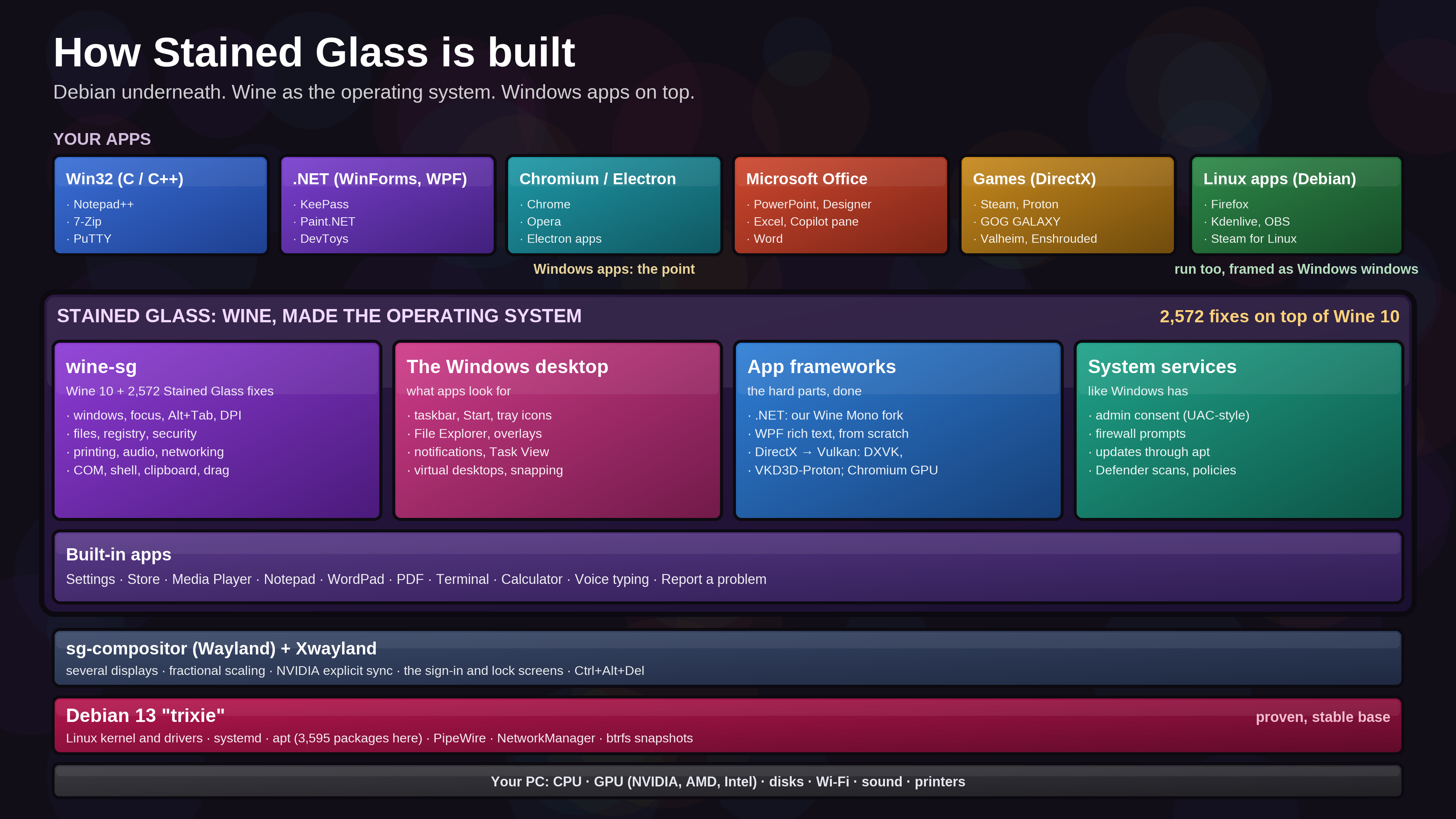
More detail, in plain terms: How it works.
A tour: Reverse-Engineered Windows
8 November 2026. The first look at Stained Glass OS: how it differs from ReactOS, what Wine is and how much the project adds to it, accounts and the consent prompt, the new shell and compositor, installing it, the SG Store, Microsoft Word and OneDrive, label printers and scanners, domain controllers, updates with restore points, and how it is being built.
Transcript
This is not Windows. Neither is this. Or this one. These are all different looks of one operating system, called Stained Glass.
Stained Glass is an attempt to build an open source, Windows-like operating system. It's sort of in the vein of ReactOS mixed with Wine. ReactOS and Stained Glass share a common goal, but they go about it in completely different ways. ReactOS starts at the kernel and builds its way out, implementing as close to an NT operating system as it can. Stained Glass starts from Debian, the Linux kernel and Wine, and builds out from those. That gives you a rock solid kernel, and really good driver support for the basics: graphics cards, network cards, Wi-Fi, storage. ReactOS has to write all of that again, on its own kernel.
For those who don't know, Wine is a translation layer. It takes Windows system calls and translates them into their Linux equivalents. At the time of writing, Stained Glass carries about two and a half thousand patches on top of Wine. That's roughly nine hundred thousand new lines of code, across more than four hundred of Wine's libraries. Around twenty thousand Windows functions written or filled in, and more than seven thousand stubs, functions stock Wine only pretended to have, made real.
Stock Wine has no system-wide registry, separate from each user's, and not much of a security model at all. So a lot of the early work went into the basics a Windows machine takes for granted. A real login screen. Separate user accounts, each starting from a copy of the default user profile. Administrators and standard users, and a consent prompt when something needs an administrator.
The shell is completely new. It takes the Wine desktop and turns it into a real desktop environment. Start menu, taskbar, File Explorer, Settings, Control Panel, Task Manager. Under the hood it's a Wayland compositor of its own, and every window, Windows or Linux, is its own window on it. So Linux apps and Windows apps sit side by side, on the same taskbar, and you stop thinking about which is which.
The installation is a lot more Windows than Linux. Boot the ISO, and you can try it live, or install it. The installer will look very familiar if you've ever installed Windows 10. Pick a disk, click Next. Underneath, it's installing Debian onto a btrfs file system. Then the first start walks you through your region, your keyboard, your network and your privacy settings. And there's your desktop.
There's an app store, and it installs both Linux apps and Windows apps. Around a hundred and eighty Windows apps, and nearly two hundred Linux apps, today. When an app has a Linux build and a Windows build, it's one card, and it suggests the Linux one. Pick one, click Install, and it handles the rest. The Windows installer runs quietly, the Linux package comes straight from Debian. Click Open, and there it is.
You're not limited to the store, either. Download a Debian package and double-click it, and it tells you what it is and installs it, like any Linux package. Download a Windows installer and double-click that, and it installs like it would on Windows. Downloads are scanned for viruses as they land, with ClamAV built in.
And yes, Microsoft Office. Word installs, signs in, and runs. And OneDrive syncs, with its status right there in File Explorer, the way you'd expect.
There's also a lot of work in the printer and USB layers. Linux doesn't have great support for some of the devices offices actually run on, like label printers and document scanners. Stained Glass takes the Windows side of things, and pipes it straight to the USB device. So things like Dymo Connect, and Ambir scanners, just work.
It can act as a domain controller, or join an existing one. Which makes it a drop-in replacement for a Windows machine on an office network.
Updates come the Linux way, under the hood. Every Stained Glass component is a Debian package, and every installation comes with its own repository. When anything changes, a new package is built and pushed, and your machine picks it up as an update. Just like a normal Windows update. And because it's btrfs, every update takes a restore point first. If an update ever goes bad, you roll back, right from the boot menu.
It has zero tracking. It doesn't collect or send any diagnostic data. It's effectively fully open source. And it has maybe one of the best Wine compatibility environments to date. Not every Windows app behaves. When one doesn't, there's a built-in way to report it, and it gathers the logs for you.
Which leads me into how this is being built. I architected the basic structure. How Debian gets layered with Wine, Wine with Wayland, and Wayland with X11. Then I've had AI agents, mostly Claude Opus, working around the clock. They implement the pieces Wine is missing, install real Windows apps, and fix the bugs they run into. And every fix comes with a test that proves it.
It's not just a copy of a Windows desktop, though. It has some extra fun, too. Like any good Linux desktop, it has wobbly windows. And since it's Stained Glass, there's a live desktop background of stained glass, that shapes itself around your windows. You can mix and match the look, from classic, to rounded, to glass. And you can talk to it. Press the Start key and H, and type with your voice, all on your own machine.
It's far from a complete operating system. But it's good enough that I daily drive it on my laptop. If you try it, my suggestion is: install Linux apps where they exist, and fall back to Windows apps where you need them. At the time of writing, it only supports UEFI, and Secure Boot has to be turned off. For those adventurous enough to give it a go, the link to download the ISO is in the description. Bug reports are welcome.
Since this video: legacy BIOS PCs are supported too (FAQ). Secure Boot still has to be off.